(1) Everyone has the right to work, to free choice of employment, to just and favourable conditions of work and to protection against unemployment. (2) Everyone, without any discrimination, has the right to equal pay for equal work. (3) Everyone who works has the right to just and favourable remuneration ensuring for himself and his family an existence worthy of human dignity, and supplemented, if necessary, by other means of social protection.
(…)
Article 25.
(1) Everyone has the right to a standard of living adequate for the health and well-being of himself and of his family, including food, clothing, housing and medical care and necessary social services, and the right to security in the event of unemployment, sickness, disability, widowhood, old age or other lack of livelihood in circumstances beyond his control.
(and that’s just the basics on that topic, 22 is a good summary and 24 is worth knowing about too, and by the way since it’s currently relevant, “No one shall be subjected to arbitrary arrest, detention or exile.” is article 9.)
Friendly reminder the USA have not ratified the Declaration of Basic Human Rights.
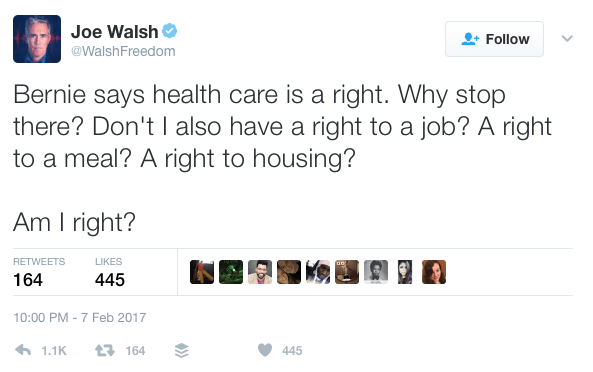
I always find it fascinating that Americans cannot understand that basic human needs should not be luxuries. And before the idiots descend. A right to a house does not mean a 5 bedroomed, pooled mansion, but a warm home with a fridge, cooker, bed, and a toilet.
Millennials are going to kill the telemarketing and phone scam industries because I don’t know about y’all but I don’t even answer the phone for my own mother, if you need me you’re texting me
The next time I see one of those “millenials will be photographing the end of the world” posts I’m gonna scream because let me tell you, I just went through a natural disaster and Snapchat literally saved people’s lives. Thanks to snapchat I knew exactly what roads were flooded, what stores were open, what my HOUSE looked like (since I wasn’t there), and which shelters I could go to. People were snapping/tweeting asking to be rescued and THEY WERE. I didn’t get my news from the tv, I saw it in real time on social media and I will never not be grateful for that.
– Criticized the Jews for defending themselves against the Holocaust because he insisted that they should have committed public mass suicide in order to “shame” the Germans instead of fighting back. His exact words were, “But the Jews should have offered themselves to the butcher’s knife. They should have thrown themselves into the sea from the cliffs. As it is, they succumbed anyway in their millions.”
– Wrote an open letter to the British people in 1940 telling them to surrender to the Axis even if it mean accepting genocide.
– Was very anti-black. I hope you can stomach reading how he treated black people in South Africa. It’s fucking disgusting.
– Refused his wife life-saving medication (for religious reasons), but those religious reasons all of a sudden no longer applied to him when he was in a similar position.
– Refused to have sex with his wife for the last 38 years of their marriage. He felt that in order to test his commitment to celibacy, he would have beautiful young women (including his own great niece) lie next to him naked through the night. His wife, whom he described as looking like a “meek cow” was no longer desirable enough to be a solid test.
– Believed that Indian women who were raped lost their value as a human.
– During his time as a dissident in South Africa, he discovered that a young male was harassing two of his female followers. He responded by cutting the girls’ hair off to ensure the “sinner’s eye” was “sterilized.” He later boasted about the incident in his writings, pushing the message to all Indians that women should carry responsibility for sexual attacks upon them.
– Argued that fathers could be justified in killing daughters who had been sexually assaulted for the sake of family and community honor.
– Believed that menstruation was a manifestation of the distortion of a woman’s soul by her sexuality.
– Waged a war against contraceptives, labeling Indian women who used them as whores.
– Held the attitude that women were simply creatures that could bring either pride or shame to the men who own them.
Hey there Anon! Sure thing! I’ll do my best to explain the process of how I usually do things in regards to coloring and shading. I’m not the greatest at Explaining, so I’ll do my best to keep things as crystal clear as possible!
Step 1: Lineart I’ll start with Lineart purely because this step is important to the coloring process in one regard, and that is making sure the entire line layer is closed without any holes. Even the smallest little gap will make the selection process hard later, and we don’t want that. So the cleaner lineart you have, the better. I’m going to go ahead and use my Monster Hunter Generations Huntress for this.
Step 2: Selection Either in Photoshop or SAI or whatever you use, click outside your character and any other negative space surrounding them. This means…basically anything that’s not your character. Then go to Selection > Inverse and invert the selection. You should have something similar to what I have below. This makes it so much easier to add colors without having to worry about all the little nooks and crannies that could mess the cleanliness of the drawing up real bad.
Step 3: Flat Base Create a new layer beneath your line layer with the selection still active. This will be our color layer. Remove the visibility of the line layer, and fill the remaining “Silhouette” with a dark base color. This makes those nasty corners look a bit cleaner, as sometimes if there is a lighter color your computer will want to make them stand out pixelated. Again, this is just for cleanliness beneath the line layer. Turn your line layer back on, as they will now act as barriers for the fill bucket tool. Make sure the entire silhouette is filled, and that no lines were accidentally selected! You want a see a completely filled and flat color if you turn the line layer off.
Step 4: Flat Colors At this point you can lock the transparency of your Color Layer, and go ham. Either with the pen or a fill bucket, figure out how you want to color your character and add in the flat colors. Notice I’m on the same layer as the Base that we made. This is so those lines still play nicely with one another. Clean up where necessary.
Step 5: Analogous Color Gradient Well, we don’t really want our character to be too flat, do we? This is where the color wheel becomes your best friend. Select similar colors with the Magic Wand (like I’ve done her skin tone here) and using the color wheel, choose an analogous (that means “close by” in color wheel terms) color to add a bit of depth to the color. For skin, I usually go with a red or a bronze, sometimes purple. Use the airbrush for this. Then, deselect and select another color to gradient, until all the colors have some degree of new color to them.
See? Now things look interesting! We added some blue to the greens, some purples to the reds, some blues to the grays and so on and so forth.
Step 6: Shading Okay, here’s where things get interesting. Time to shade. Make a new layer between the Line Layer and Color Layer, and make sure you make it a clipping group/clipping mask. This is so it won’t go anywhere that you don’t have color. Set it to multiply or linear burn (whichever you think looks best) and bump the opacity down to about 40-50%. Choose a color that you want the shadows to be; I like deep pinks and purples. I first use the Pen tool to get down “hard” shadows – shadows cast by hard materials, close shadows, and inorganic materials. Once I’ve got those down, I head on over to the softer areas, such as the skin, hair and cloth and alternate between the watercolor and marker tools to give “softer” shadows. There’s no real law to this, you just have to know where shadows fall and how they behave and work with those three tools to get the look you want.
Step 7: “Highlights” – Rim Lighting Okay, these aren’t really “highlights” in the correct sense, but adding sort of “rim lighting” around forms really helps make a picture pop. To do this, make another layer above the shading layer, set it to “screen” and keep the opacity at 100%. Then, get really familiar with your CRTL key because you’re going to be color sourcing a lot. To add a rim light to a form, select the base color of that form, and use the marker to trace along the edges. For example, I picked up the nude from the skin, the silver from the dagger, the gold and maroon from the hair and the tawny brown from the skull to use on those specific objects. Any place you want clean works well, but the edges of forms works best for this technique. Additionally, if you’d like, you can create another layer above the Screen Layer and set it to Linear Dogde, and do my “glowing eyes” technique on anything you want to stand out, such as the metal of the belt, gold objects and of course, eyes.
Step 8: The Overlay Almost done! While your photo can now stand alone as “finished”, there’s one more thing that I enjoy doing, and that’s adding a simple color overlay to bring the whole picture together. This is done by flattening all the layers you have so far (you’ll want to “Merge Down” in order from bottom to top or “Flatten” to avoid the layers going crazy on each other) into one layer. Then, make a layer on top of that one, set it to a clipping mask, and set it to “overlay”. With the Airbrush, choose some colors (I prefer soft pinks, blues and violets) and go along the “edges” of your character with a BIIIIIG brush. This kind of resembles soft ambient lighting or shadows. I just think it makes the photo look nicer.
TA-DA! And Now we’re done!
And there we go! I hope that helped, and I also apologize cause this ask sat in my box for awhile and I never got around to it until now. 😛 I’d be happy to answer any questions y’all have, but this is the simple basics! Remember to practice practice PRACTICE! -Gael
Jag tycker att… – I think that… Jag menar att… – I mean… Jag förstår/fattar – I understand Jag förstår/fattar inte – I don’t understand Min åsikt är den att… – My opinion is that…
Det tycker/anser jag också – I agree Det stämmer – That’s right Det är sant – That’s true Det har du rätt i – That’s where you’re right
Det tycker/anser jag inte – I do not agree Det stämmer inte – That’s not right Det är inte sant – That’s not true Jag tror att du har fel – I believe that you’re wrong Tvärtom – Vice versa, on the contrary
Välkommen – Welcome Lycka till – Good luck Grattis/Gratulerar – Congratulations Grattis på födelsedagen – Happy birthday Ha det så bra – (lit. Have it so good) Take care of yourself, have a good time, farewell etc. Hälsa alla – Say hello to everyone Krya på dig – Get well
Förlåt – Sorry Jag är ledsen – I am sorry Vad synd – What a shame/pity


You must be logged in to post a comment.